
Choosing the correct cable gland size is not just a “fit-and-finish” detail—it directly affects sealing performance, strain relief, ingress protection (IP rating), and long-term safety. This SEO-friendly, step-by-step guide explains how to calculate the required cable gland size (in a practical way you can apply in the field), including worked examples and a quick checklist for WordPress publishing.
What Is a Cable Gland (and Why Sizing Matters)?
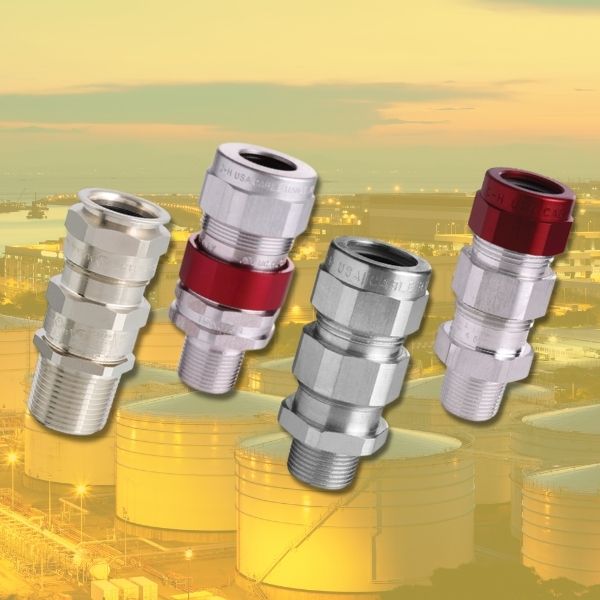
A cable gland is a mechanical device used to secure, seal, and protect a cable as it enters an enclosure or equipment. Correct sizing ensures:
- Proper sealing against dust/water (IP65, IP66, IP67, etc.)
- Reliable strain relief (reduces pull stress on terminations)
- Safe cable retention and reduced risk of cable damage
- Compatibility with enclosure entry threads (metric, NPT, PG)
If you choose the wrong size, the gland may not seal, may crush the cable, or may not fit the enclosure entry at all.
Key Measurements You Need Before Calculating Cable Gland Size
Before selecting the gland, collect these data (from cable datasheet or measurement):
- Cable Outer Diameter (OD)
This is the most important input.
Measure with a caliper for best accuracy. - Number of Cables (Single vs Multiple)
One gland can be sized for one cable or for multiple cables using multi-hole inserts (special glands). - Cable Type
- Unarmored / flexible cable
- Armored (SWA, AWA)
- Shielded / screened
- Control vs power cable (OD differs)
- Required Protection Rating (IP / Ex / EMI)
Environmental requirements affect gland type and sometimes size range. - Enclosure Entry Thread Type
Common types: Metric (M), NPT, PG
This is often confused with cable OD, but they are different.
Step-by-Step: How to Calculate the Cable Gland Size You Need
Step 1 — Measure the Cable Outer Diameter (OD)
Use a caliper to measure the cable at multiple points.
Example:
Cable OD = 11.6 mm
Tip: If the cable is slightly oval, use the largest measured diameter.
Step 2 — Determine the Gland’s Clamping (Sealing) Range
Manufacturers list a cable clamping range, such as:
- 6–12 mm
- 10–14 mm
- 12–17 mm
Your cable OD must fall inside this range.
Rule:
Choose a gland where:
Minimum range ≤ Cable OD ≤ Maximum range
Example: OD 11.6 mm
A gland with range 10–14 mm fits perfectly.
Step 3 — Apply a Practical “Tolerance” Check (Real-World Fit)
Cables can vary by manufacturer and jacket thickness. For reliable sealing:
- Avoid choosing a gland where the OD is right at the minimum
- Avoid choosing a gland where the OD is right at the maximum
Practical guideline:
Aim for the cable OD to sit near the middle of the clamping range.
Example:
OD 11.6 mm in 10–14 mm range → good (middle-ish)
OD 13.9 mm in 10–14 mm range → risk (near max)
Step 4 — Match the Thread Size to the Enclosure Entry
Cable OD determines the clamping range, but the thread size must match your enclosure hole/thread.
For metric glands, common pairings (varies by manufacturer) often look like:
- M16: small OD ranges (e.g., 4–8 mm)
- M20: medium OD ranges (e.g., 6–12 mm)
- M25: larger OD ranges (e.g., 11–17 mm)
- M32: larger OD ranges (e.g., 15–22 mm)
Important: Always confirm with the gland datasheet. Two different M20 glands may have different clamping ranges.
Step 5 — Confirm the Hole Size (If You’re Drilling)
If the enclosure is not pre-threaded and you’re drilling:
- You must drill the correct clearance hole or prepare a threaded hole.
- The gland datasheet specifies:
- Mounting hole diameter
- Thread pitch
- Locknut size
Example:
You may need a 20.5 mm mounting hole for an M20 gland (example only—check datasheet).
Step 6 — Special Case: Armored Cable (Armour Diameter Matters)
For armored cable glands, sizing may require two checks:
- Cable outer sheath OD (for outer seal)
- Armour diameter / armour wire range (for armor clamp)
So you must select a gland designed for armored cable, not a standard nylon/compression gland.
Worked Examples (Fast and Practical)
Example 1: Unarmored Cable, Simple Selection
- Cable OD: 7.2 mm
- Candidate gland ranges:
- 4–8 mm
- 6–12 mm
Best choice: 4–8 mm (OD sits nicely inside the range)
Then confirm the thread matches your enclosure (e.g., M16 vs M20).
Example 2: Cable OD Near Maximum (Avoid if Possible)
- Cable OD: 11.9 mm
- Candidate range: 6–12 mm
This is near max and may be tight or fail sealing if OD varies.
Better: choose a gland with 10–14 mm range if available (and suitable thread entry exists).
Example 3: Two Cables Through One Entry (Not Recommended Unless Designed)
If you must run two cables through one opening, don’t “force” them into a single gland.
Use:
- A multi-hole cable gland, or
- Two separate glands (best practice)
Sizing then depends on the insert design and each cable OD.
Quick Checklist: Correct Cable Gland Size Selection
- Measure cable outer diameter (OD) accurately
- Choose a gland clamping range that comfortably includes OD
- Verify the thread type (M / PG / NPT)
- Verify enclosure entry hole size or tapping specification
- Confirm required IP rating and environment
- For armored cable: verify armor clamp range too
- Use manufacturer datasheet as final authority
Common Mistakes to Avoid (That Cause Leaks or Cable Damage)
- Confusing thread size with cable size (M20 does not mean 20 mm cable)
- Picking a range where the cable OD sits at the limit
- Ignoring cable jacket variation between brands
- Using unarmored glands on armored cables
- Not checking hole size or thread compatibility
FAQ: Cable Gland Sizing
What measurement determines cable gland size the most?
The cable outer diameter (OD) determines the required clamping range.
Does “M20” mean the cable is 20 mm?
No. M20 refers to the thread size, not the cable diameter.
Should I choose a tighter gland for better sealing?
Not necessarily. Too tight can damage the cable. Aim for OD near the middle of the clamping range.